Dashboard
Your agent is the interface. You don't have to read this page to get the dashboard: tell your coding agent one sentence, and it installs the skill if it is missing, then writes the Pages workflow or the pages job and names the settings that stay yours — the installation page has the whole picture.
Install the Keep the Why skill if it isn't installed yet — pick the best installation method for you from https://keepthewhy.com/installation/ — then publish the Keep the Why dashboard.
keep-the-why-dashboard is a read-only viewer over what a Keep the Why project already has: the entries in context/, the config in .keep-the-why, the linter's findings, and the Git history of all of it — who created each entry, who last touched it, when its Status changed and by whom. And it does not stop at one project: projects can be connected — the repositories of a suite as a family, any entry citing an entry in another repository — and the dashboard draws those links as a graph you can walk, from your own projects into the ones they cite and back. The globe goes further: out into every published project, wave by wave, and through the registry.
It connects data that is already lying around. It writes nothing into any project, runs no daemon beyond the terminal you start it in, and is never a source of truth: delete it and nothing is lost. The one file it keeps is ~/.keep-the-why/projects.json: where the projects you opened live on this machine, shared with the skill's own setup check, so the project menu can offer them again (a dashboard-history.json from before 0.2.0 is folded in and removed). That is what keeps it inside this project's own rule — no new platform, database, daemon, account, or workflow — a lens on Markdown and Git, not a place where anything lives.

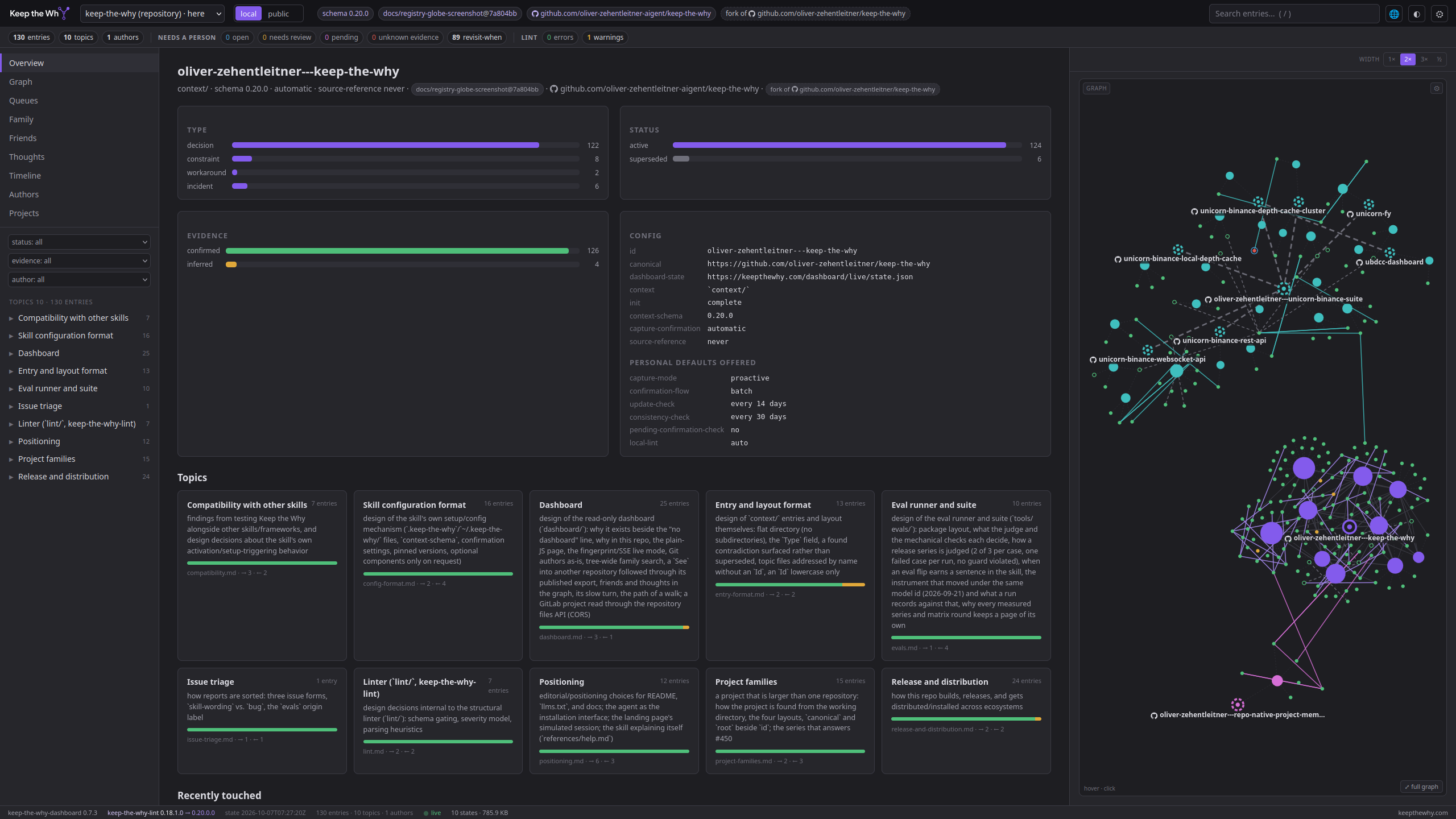
Live example: this repository's own context/, exported on every docs build — the screenshot above is a click away from the real thing.
Family, friends, thoughts
Three ways projects and entries connect, from close to loose — each one read from what the entries already say, none of them written by the dashboard.
Family — projects that belong together. A parent lists its children in its .keep-the-why, one scope line each, and each child names its parent; that list is the routing: the agent writes an entry into the member whose scope fits (Setup, "Family"). The dashboard can show a family as one: with the family scope every view — overview, topics, queues, search, the graph — covers the whole tree, and the Family view shows its shape.
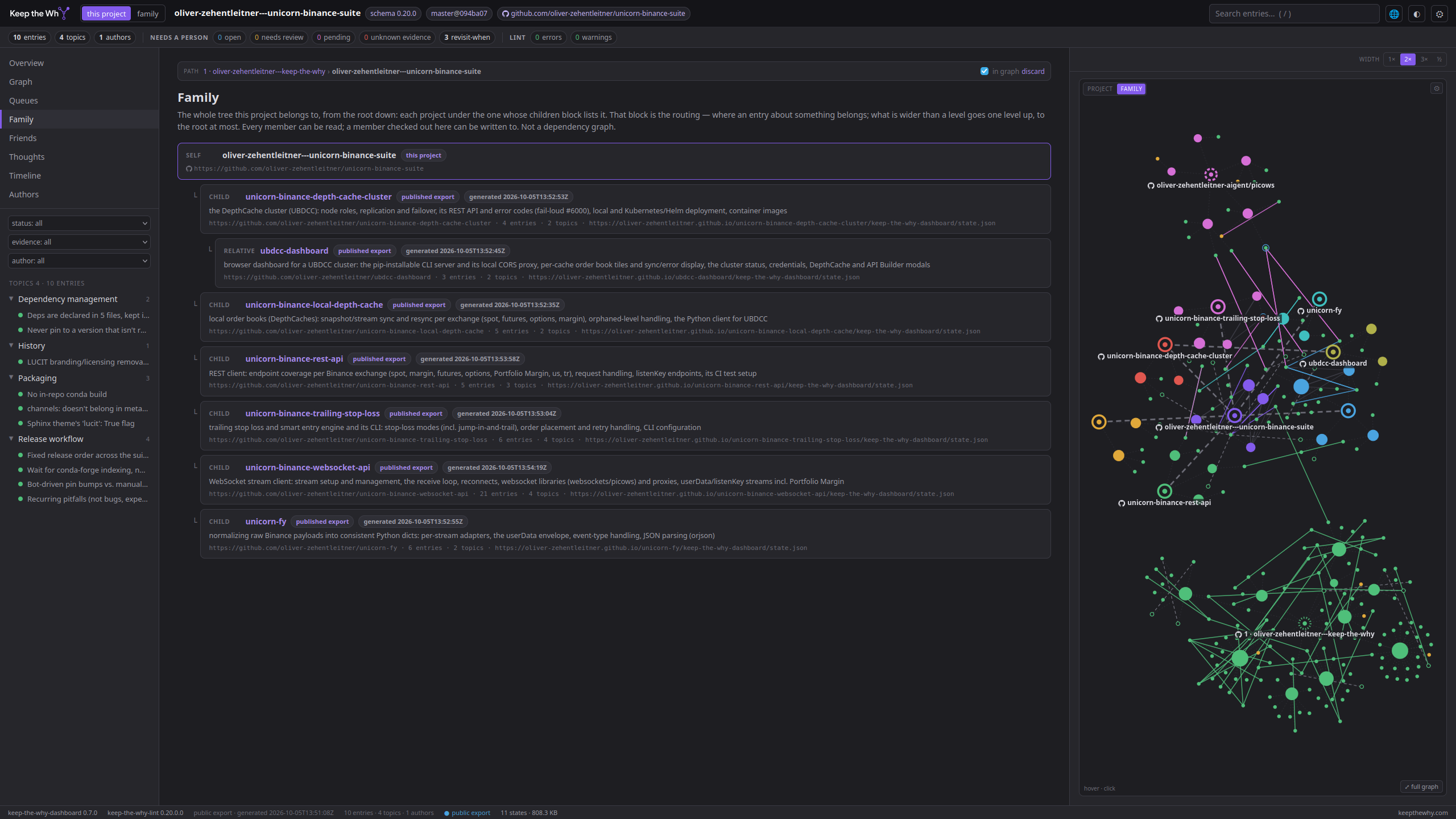
Friends — repositories outside the family that entries here cite, with a See or Superseded by line naming the other repository's canonical and an entry's Id. Nothing is routed between friends; they are only linked. The graph draws each friend as a hub with the entries that connect to this project — a friend that is part of a family comes as its whole family, one unit like a repository. One hop: a friend's own friends are not loaded. Click a friend's name to walk there and look one hop from it; the page keeps the path you walked, so a web of projects is read from centre to centre. The Friends view lists them, with what cites what in both directions.
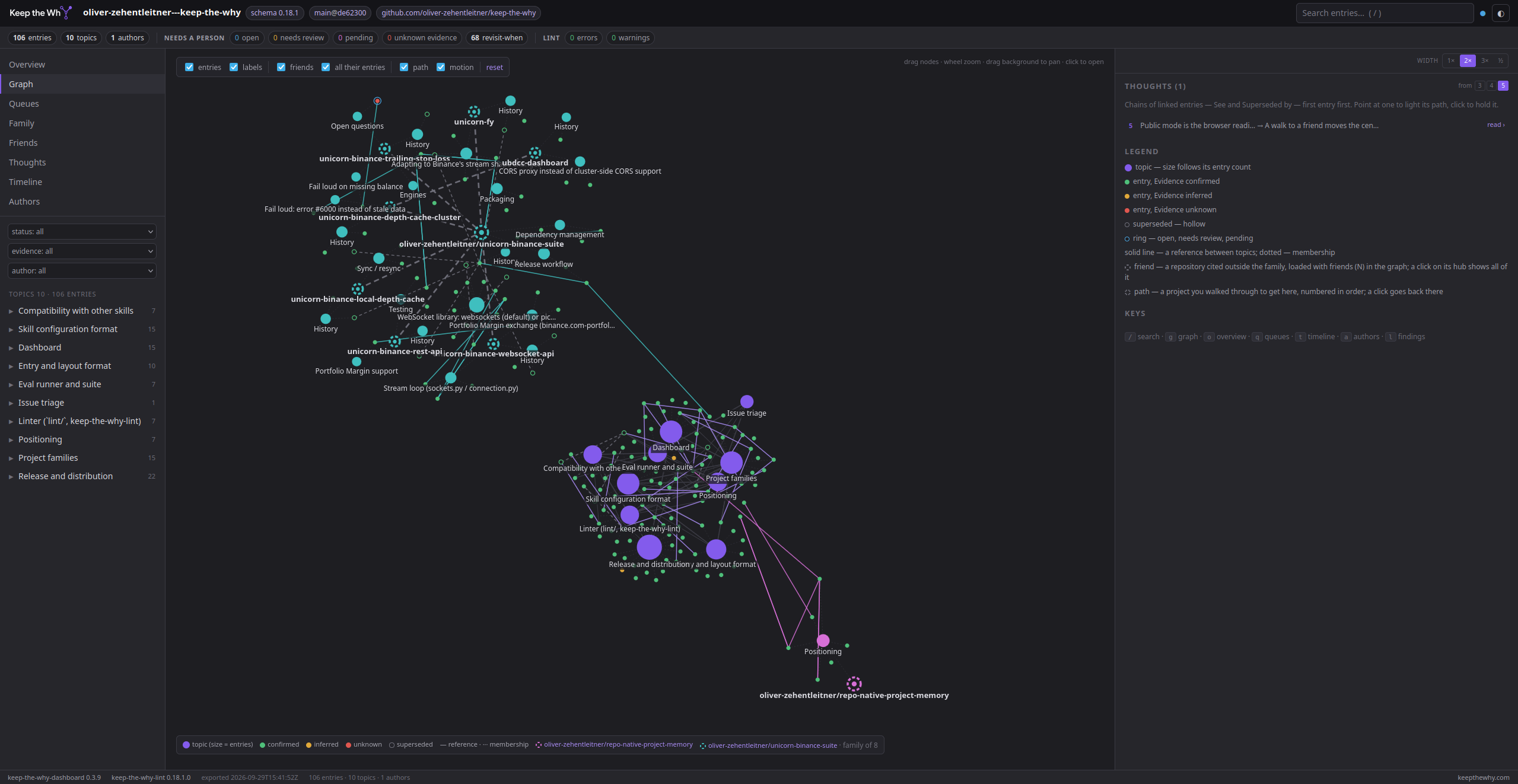
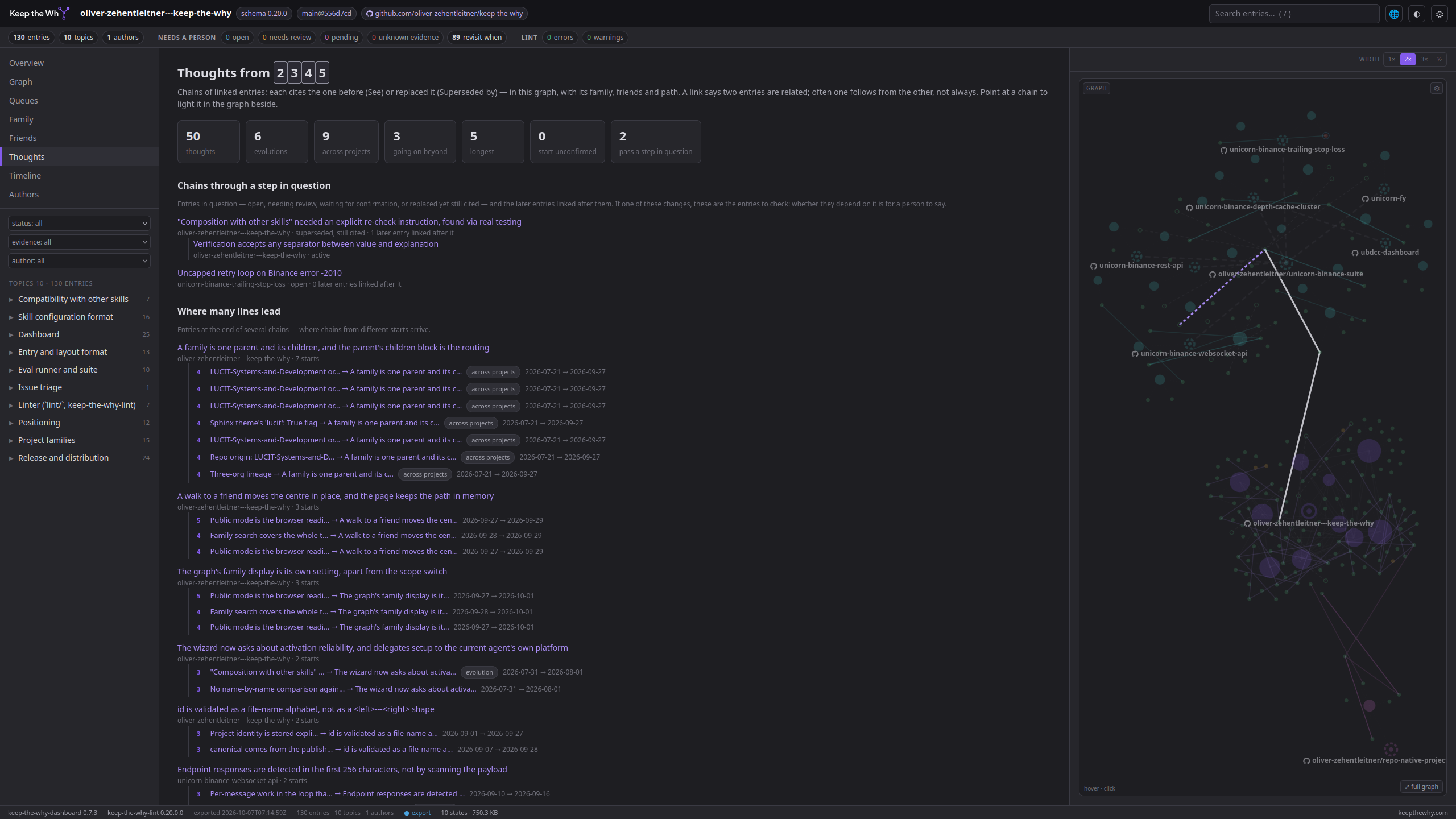
Thoughts — chains of linked entries: each one cites the one before (See) or replaced it (Superseded by), across projects wherever the graph reaches. Nobody writes a thought; the recorded citations are one. Beside the graph they are listed and light up when pointed at, read › shows a whole thought in one view, and an entry shows the thoughts it is a step of. The Thoughts view adds what the lines have in common — where many lead, where many start, the entries many pass through — and where they need a second look: a chain that starts from an entry nobody confirmed, or passes a step in question, with the entries linked after it (a link says related — often follows from, not always), when a line grew. A chain that goes on into a repository the page has not loaded is marked, and one click follows it there.
The timeline
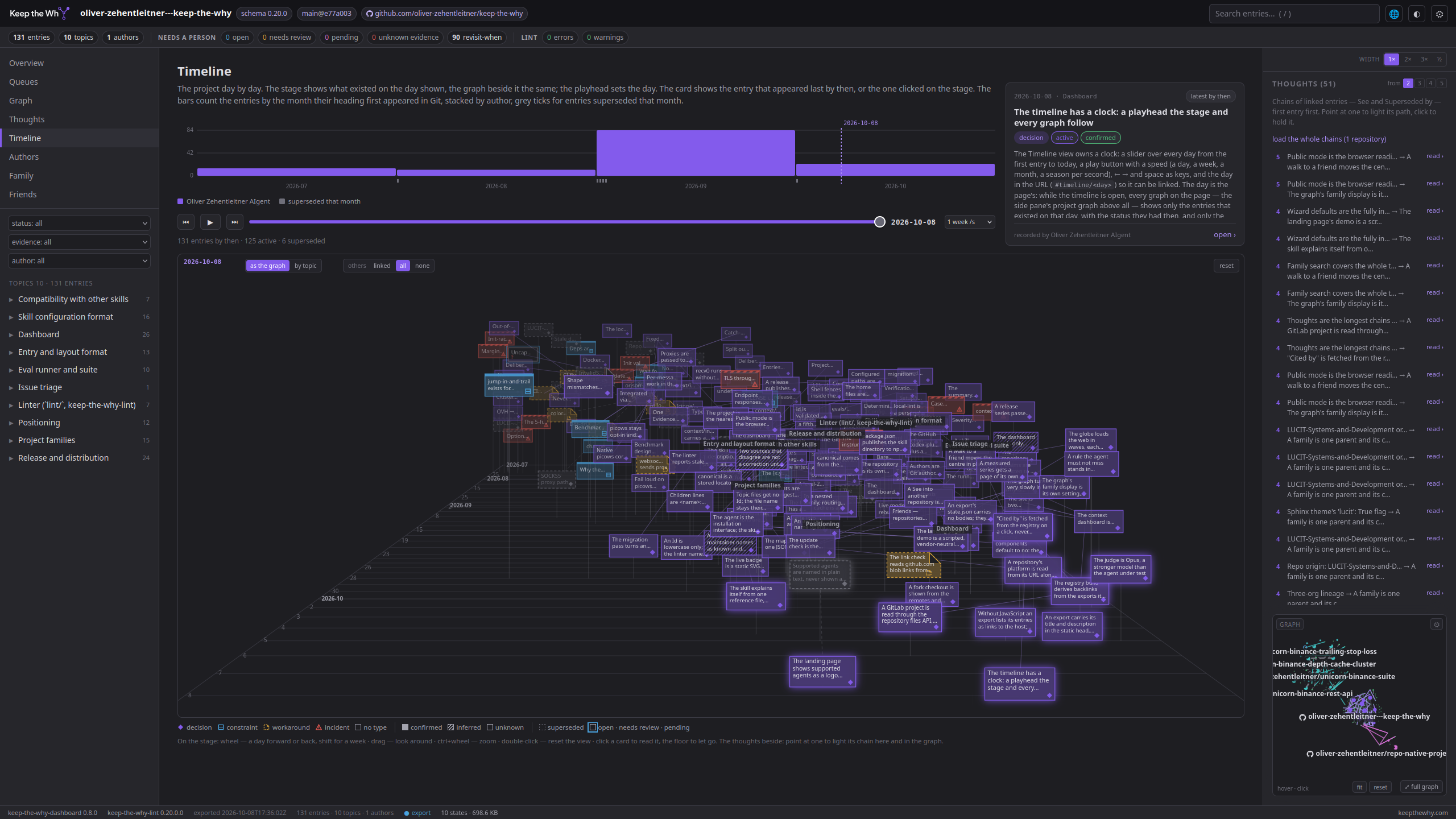
The project day by day. A slider sets the day the page shows and every graph on the page follows it — what existed on that day, with the status it had then, and the See and Superseded by lines written by then. Under the clock a stage shows the same entries in perspective: time runs into the depth, the day shown is the near plane, what came before recedes; a card per entry in the colour and shape of its Type, filled by Evidence, edged by Status, standing where its node stands in the graph beside. Play the days and the project builds itself up, entry by entry, chain by chain; point at a thought in the pane and its chain lights up here and in the graph.
Run it
pip install keep-the-why-dashboard
ktw-dashboard            # in a project with a .keep-the-why file
The page opens at http://127.0.0.1:8765/ and stays current: the server checks the project's fingerprint (HEAD, .git/index and .git/HEAD, .mailmap, .keep-the-why, AGENTS.md, the files under context/) every two seconds and pushes a fresh state to every open page when something changed — after a git pull as much as after an agent wrote an entry a moment ago. Uncommitted entries show as author working tree, which makes the page a live window on what the skill is capturing during a session.
ktw-dashboard [PATH] [--host 127.0.0.1] [--port 8765] [--no-browser] [--interval 2]
              [--scan DIR] [--no-history] [--no-update-check] [--export DIR] [--anonymize] [--json] [--version]
| Flag | Effect |
|---|---|
--export DIR |
writes DIR/index.html, one self-contained page with the state embedded — its title Keep the Why Dashboard · \<owner/repo> (the project's id when no repository is known), a description naming the repository and its entry count, and the Keep the Why card as preview image, for search results and link previews (no server; nothing loaded from elsewhere when it opens — the page asks other hosts only for what a person opens — another project's published .keep-the-why and state.json when an entry with a reference into that repository is shown, the family scope is chosen, the Family view is opened, an entry Id this export does not hold is opened, a graph is shown with friends on (the default), or public mode is on, and a host's API for one commit on a click on an author's name), plus DIR/state.json and two live badges, DIR/badge-entries.svg (Keep the Why's style) and DIR/badge-entries-flat.svg (flat) — static SVG with the project's numbers, "42 entries · 3 open", for the README to link to this export, no badge service in between — on a family root whose members all live in this repository also DIR/badge-family.svg and DIR/badge-family-flat.svg with the whole family's numbers (badge page); then exits. For GitHub Pages, a release asset, or the link behind the live badge |
--json |
prints the state and exits |
--anonymize |
Git author names become author-1, author-2, … — for exports of repositories whose contributors did not ask to be listed on a web page. E-mail addresses are never part of the state |
--scan DIR |
also look for projects under DIR (two levels deep) for the project menu; the parent of the start directory is always scanned |
--no-history |
neither read nor update ~/.keep-the-why/projects.json (where projects have been seen; the skill keeps the same file) |
--no-update-check |
don't ask pypi.org for newer versions of the dashboard and the linter — the check runs at start and once every 24 hours and is the server's only network call; a found update makes the package's entry in the status bar shimmer, with the version and the pip install -U line in its tooltip. The exported page never checks |
--host 0.0.0.0 |
exposes the page on the network; the CLI warns. Everything shown is the project's context/ — treat the port like the repository |
Publish it on GitHub Pages or GitLab Pages
Say to your agent: "publish the Keep the Why dashboard". With a docs build already deploying the site, it adds the export step to that build; without one, it writes a deploy of its own that exports the dashboard. The exact steps are in CI, dashboard and registry setup. It writes dashboard-state into .keep-the-why and offers the live badge.
- GitHub: a workflow deploys to GitHub Pages. One setting stays yours: the repository's Settings → Pages → Build and deployment → Source has to be GitHub Actions. The agent names the page, and switches it only when you ask it to. After the next push to the default branch the dashboard is at
https://<owner>.github.io/<repo>/keep-the-why-dashboard/. - GitLab: a
pagesjob in.gitlab-ci.yml. The settings that stay yours: a verified account, without which CI doesn't run on gitlab.com; the project's Pages visibility set to Everyone; and, if Use unique domain is on, the generated domain the site is served under. The dashboard is then athttps://<namespace>.gitlab.io/<project>/keep-the-why-dashboard/. keep-the-why-demo runs exactly this.
Once the dashboard is published, the agent offers the registry listing once, and opens its pull request only if you say so.
Show a proposal before it is merged
A context/ that exists only in a pull request — a retrospective pass for a project that never had one, or a migration — can be shown rendered before the maintainer merges or installs anything: export the page from the branch and publish the export on the fork's own GitHub Pages.
git checkout <the branch>                                     # in the fork's checkout
ktw-dashboard --export out --anonymize --no-browser --no-history --no-update-check .
Publish out/ as the fork's gh-pages branch — an orphan branch holding the four exported files and an empty .nojekyll — and switch Pages on once for that branch (gh api -X POST repos/<owner>/<repo>/pages -f build_type=legacy -f "source[branch]=gh-pages" -f "source[path]=/", or the repository's settings). A minute later https://<owner>.github.io/<repo>/ shows the whole page: overview, graph with every See line, friends where the branch cites other repositories, the queues — from one static file, nothing installed, nothing cloned, nothing merged. Link it from the pull request.
Three things to know. The page is a snapshot of the branch: re-export and push gh-pages again after the pull request changes. --anonymize because it is someone else's repository — the contributors did not ask to be listed on a page of yours. And a See line into the branch from another project resolves only once the branch is merged (the other page reads the repository's published export at HEAD), while the branch's own See lines out to projects that publish their export resolve right away — a proposal that cites a friend already shows the friendship, the friend shows it back after the merge.
First used for tarasko/picows#111, rendered at oliver-zehentleitner-aigent.github.io/picows.
Several projects
Started inside a project, the dashboard shows that one. The project menu shows families grouped — a parent, its children indented below it — and each project's type, repository or cache; the Projects view is the same list with the details and the forget control. The project menu in the top bar lists the ten most recently opened projects (one project id can appear at several paths — clones, worktrees), projects found near the start directory, and ids that have a personal file in ~/.keep-the-why/ but no known location yet; opening a project moves it to the top of the history. An export of a family member has a project menu as well, in place of the bare id: the family's tree from the members' published exports, the root first, each member under the one that lists it; choosing one walks there in place, as the graph does — nothing reloads, and the path stays as it is: a move inside the family is not a step of the path. A member without a published export is listed and cannot be chosen.
What it shows
| View | Content |
|---|---|
| Strip (every view) | entries, topics, authors · what needs a person: open, needs review, pending confirmation, unknown evidence, revisit-when triggers · linter errors and warnings — each a link |
| Overview | Type / Status / Evidence distributions, config (canonical, dashboard-state and context open on the host; and the personal defaults the project offers), topic cards, recently touched entries; with the family scope a banner naming the members |
| Queues | what needs a person: Status: open, needs-review, pending-confirmation, Evidence: unknown on every entry still in force — an open question with an untraced origin counts there too, since Evidence and Status are separate axes — and the Revisit when triggers on record. An entry can wait in two queues; the count next to Queues counts it once. Whether a trigger has fired is a human judgement; the page lists, it does not decide |
| Graph | topics as hubs, entries around them colored by Evidence — a ring marks open / needs-review / pending-confirmation, a hollow dot superseded — and references between topics as edges, plus every See and Superseded by between two entries, found by Id (drawn between their topics while entries are hidden). Drag, zoom, hover to focus a neighbourhood; a click on an entry opens a preview beside it — the timeline's card: title, pills, the whole body, open › to the entry's page — and a click on a topic its preview: the topic's entries with their status and evidence, each a click away from its own preview; a click on the background, × or Esc closes it; fit and reset in the corner fit the view (centred on the point the graph turns around while it turns) and let go of the held thought. Around the project: its family, its friends with their families, and the path walked to get here, each as hubs with their entries — what is drawn, and how much of it, is the control bar's business; see The graph below |
| Topics and the reader | one topic file with its entries; an entry rendered with its fields, Reason / Rejected alternative / Consequence as callouts, references as links, previous / next |
| Details pane | for the open entry: fields, created by / last touched / status history from Git, backlinks (entries elsewhere that reference this file), linter findings on this entry. Its graph has a switch in the corner — near (the entry's or topic's neighbourhood, including every entry it points at or that points at it by See or Superseded by), project, and family where the family scope is available. It starts with the page: near on an entry or a topic, otherwise the scope next to the project menu, so with family the overview shows the family graph; a click in the corner holds until the scope changes. Beside the backlinks: the thoughts the entry is a step of (with its place in each), and for an entry in question the later entries linked after it. The pane's width is chosen at its top — 1×, 2× (the default), 3×, or half the page. ⤢ full graph in the corner of its graph opens the full graph at the same level, centred on the entry or topic shown |
| Thoughts | from N: how many entries a chain needs to count as a thought — the choices run from 2 (one link; a decision replaced once is an evolution of two) up to the longest chain on the page, and grow with it when a friend or a path brings a longer one; 4 by default, kept per browser, drawn down to the longest here when the page has none that long. The same choice sits beside the list in the graph's side pane. Then the numbers — thoughts, evolutions, across projects, going on beyond, the longest — then where many lines lead and where many start, the bridges (entries in the middle of several thoughts), a table by project (starts, passes through, ends), every thought, the evolutions, and the chains going on beyond with load the whole chains. Where a chain needs a second look: Starting from an unconfirmed entry (the first entry's Evidence is inferred or unknown) and Chains through a step in question (an entry that is open, needs review, waits for confirmation, or is superseded yet still cited by a See — with the later entries, in how many projects, linked after it; the entry itself shows Linked after this beside it). A link says two entries are related — often that one follows from the other, not always — so these lists say what to check, not what depends. How it grew: the reader dates every step and draws them on a line; the page lists the lines grown most recently and those resting longest. Pointing at a line or an entry lights it in the graph beside; pointing at a step of a thought anywhere on the page marks it in every graph. The side pane — and its graph — can be made wider from the top of the pane: 1×, 2× (the default), 3×, or half the page, one width where the pane is the graph and one where it holds details (both kept per browser) |
| Timeline | the project day by day. The text, the bars and the clock on the left with a card on the right, the stage under them: entries by the month their heading first appeared in Git, stacked by author, superseded events marked below. The clock: a slider from the first entry to now, play with a speed (an hour to a season per second, or an entry per second), ← → and space, the day in the URL (#timeline/<day>). It goes by the moment Git recorded — the author time of the commit, to the second: when the entries span two weeks or less, the slider, ← → and the wheel move by the hour (shift: a day), the label shows the hour in the reader's time zone and the URL holds it in UTC (#timeline/<day>T<hour>); an entry per second stops on each moment an entry appeared, so the entries of one commit come together. A longer span moves by the day, as does an export written before 0.11.12, which carries the day alone. The card shows the entry that appeared last by the day shown, or the one clicked on the stage. Every graph on the page follows it — what existed on that day, with the status it had then, and the See / Superseded by lines written by then — a friend's or a family member's entries as much as this project's. The stage shows the graph's entries, friends included, so a thought that crosses repositories lights every step; others on the stage shows the foreign entries joined to this project's by a chain of links (the default), all of them, or none. The stage: the same entries in perspective, time into the depth — the day shown in front, the past receding — each entry a card standing where its node stands in the graph beside (a switch on the stage puts them in a lane per topic instead) in the graph's colours; point at a card to light its node in the graph, click to read it in the card above; wheel scrubs the days, ctrl+wheel zooms, drag looks around. A card's shape and colour are its Type (decision purple with a diamond, constraint blue with a band across the top, workaround amber with a folded corner and a dashed edge, incident red with a striped band), its fill the Evidence (solid confirmed, hatched inferred, empty unknown), its edge the Status (dashed grey superseded, a ring for open / needs review / pending). The pane beside holds the thoughts list — point at a chain to light it on the stage and in the graph — and a small graph that follows the clock; every See / Superseded by written by then is a line between cards |
| Authors | every Git author of every project the page holds — this one, its family, the friends in the graph, the path — in one table with the sums and a pill per project (each a link to that project's dashboard), and a table per project under it; a name that recurs across projects is one row, a name an export anonymized stays a row per project. Per author: created, touched, superseded, first and last activity, the Evidence mix of what they created. Rows go A–Z by name; a click on a column's name — author, projects, created, touched, superseded, first, last — sorts every table by it, counts and dates from the most, a second click the other way round. Names follow the project's .mailmap, as Git's own commands do — two identities of one person are joined there, one line per identity. A name opens the author's profile on the host — asked on the click, in the browser, from the host's API for one of their commits (GitHub, Codeberg / Gitea / Forgejo, Bitbucket); GitLab's API names no account, so there, and whenever the lookup fails, the commit's page opens, which links the author. Not offered with --anonymize. Click elsewhere in the row to filter every view |
| Family | the whole tree the project belongs to, from the root down, each project nested under the one whose children block lists it — so a grandchild such as a cluster's dashboard sits under the cluster, seen from anywhere in the tree. Each member with its scope from that routing and how it is available on this machine — a working tree (read and write), a read-only context cache, or not at all, with the clone and cache commands to get it. In an export and in public mode the same tree from the members' published exports; only an export without a canonical shows the family as declared in its own config |
| Friends | a card per friend: its family, if it has one, with the members; where it was read from; which entries here cite it and which of its entries cite this project; the repositories reached by following a thought; the ones that could not be loaded, with the reason |
| Projects | everything this machine knows, from ~/.keep-the-why/projects.json, the folder next to the project and the personal files — families grouped, a parent with its children indented, each row with its type. Forget removes a row from the mapping; for a cache the directory goes too (it is never the only copy of anything), a working tree is never touched. Live server only |
| Findings | the linter's findings, each linked to the entry it sits in |
| This project / family | the second switch next to the project menu, shown when the project has a family: one setting for the whole page. With family every view shows the family merged — overview, topics in the sidebar (a heading per project), entries, authors, queues, timeline, linter findings, the numbers in the strip — with queues and counts over the whole tree. The graph has its own family setting in its control bar and does not change with the scope. A member's topic files and entries keep their project: two history.md stay two topics, an entry opens with its own repository's host link, and a topic name in its text resolves in its own project. Remembered per browser. Search chooses its scope per search (see below). |
| Local / public | a switch next to the project menu, shown when the project has a family or a published export. Local (the default) reads clones and caches on this machine — the machine the server runs on, whatever device the browser is on. A static page — an export on a docs site, opened on any device — has no such switch: it is published by nature and reads no machine. There the family scope works directly, from the members' published exports, fetched only once someone chooses the family. Public reads published exports instead, starting with this project's own: the browser fetches its .keep-the-why as a raw file from its host at HEAD, takes the dashboard-state line — the URL of its published state.json — and loads that, then the members' exports the same way; the page shows the project from its export, with the export's generated time next to the switch so nobody mistakes a snapshot for a working tree. Public mode reads what is published: a dashboard-state line that exists only on an unmerged branch does not count yet, and the page says which file it read and, when a local checkout already carries the line, that it is waiting for a merge. Nothing is cloned, nothing goes through a server of this project's — static files on the member's own pages site; a member without dashboard-state, or on a host that refuses the fetch, says so. Family and search work over the fetched exports in the same way; an entry Id is found across them |
| Copy link | ⧉ copy link beside an entry's breadcrumbs copies an address to share it by: on a published page the page's own, on the live server the project's published dashboard (from dashboard-state) — a local address only when the project publishes none, and the tooltip says which |
| Entry by Id | #entry/<uuid> opens an entry by its Id, in this project or — on the live server — in any other project known here (the page switches to it); an export or a public page looks through the family's published exports instead. Every entry link on the page uses this address, so a copied URL stays valid when a heading is reworded or an entry moves; an old #entry/<file>#<anchor> link still opens the entry and the address bar switches to the Id, and an entry without an Id keeps the anchor form. The reader shows the entry's See references (local ones as links, cross-project ones resolved as the entry is shown — family member or not: on the live server from a checkout or cache on this machine, else from that repository's published export — the one at the repository's top level, so an entry of a project below it (root) is not found this way — the row then carries the target's title, status and evidence and links into it; a target without an export, an export without that Id, or one that names another repository as its own, is said so in the row. Foreign text is shown as text, one fetch per repository, no referrer, no credentials, a timeout and a size limit), its Superseded by successor and what it supersedes; the details pane has the Id and an "open on the host" link (GitHub, GitLab, Codeberg/Gitea, Bitbucket URL forms — the one place host grammar lives) |
| Fork checkout | a dashed fork of host/owner/repo pill beside the branch and the repository, linking the repository this checkout was forked from — when the clone has an upstream remote (origin is the fork, as gh repo fork sets it up), or when origin is not the project's canonical in .keep-the-why; the tooltip says which. No host API is asked — a mirror reads the same as a fork by the second signal. An export made from a fork — the proposal preview before a merge — carries the pill, so the page says whose repository it shows |
| Without JavaScript | the graph, search and everything linked need the script; without it the page says so and is still readable. An export lists the project's topics and their entries — title, status, evidence — each linked to its file and heading on the host, then a short note on what Keep the Why is, with the logo the page carries (nothing is loaded from another host). For a reader without JavaScript, a text browser, a screen reader, and a crawler that does not run scripts. The local server shows the note alone |
| Platform marks | GitHub, GitLab, Codeberg, Bitbucket, Gitea and Forgejo show their mark before a repository's name — on the graph's hubs, in the hub list, in cross-project reference rows, the Friends and Family views and the fork pill. The platform is read from the URL alone (gitlab. and gitea. / forgejo. prefixes count for self-hosted instances); a host no rule knows gets no mark rather than a guess. The marks are inline paths in the text colour, nothing is loaded from the platforms. Another platform is one row in HOSTS in lib.js — a pull request away |
| Badges | the ⚙ beside the search shows, pointed at, the static badge and the two live ones from this project's published export (dashboard-state) — on a family root in one repository the two family badges as well, or a note naming the member that keeps them away — each as Markdown and HTML with a copy button — the badge page with the paths filled in |
| Status bar | what the page has loaded — N states · X MB; a click lists it per project: the state (embedded in this page, in full for an export's own, lean, bodies beside it for a neighbour's), the bodies (or not loaded), the .keep-the-why, each with size and address, the versions that made the export, and a link to that project's dashboard; what did not come back is counted in the bar (⚠ N failed) and listed at the bottom with the reason and the address; the two package versions, linking PyPI; when a newer release exists the entry shimmers and its tooltip names the version and the pip install -U line |
Search (/) takes one or more words, all of which must occur in an entry — its title, body, Revisit when, Source, Verification, Superseded by, Id, file, type, status or evidence. The dropdown shows the best hits in this project as you type; Enter without a selection opens the results page for this project (#search/<scope>/<query>, a link that can be shared): every hit, grouped by project, with its pills, the passage around the match, topic, file, author, dates and Id. The scope is chosen per search, not by the this project / family switch: the dropdown's first rows and a bar on the results page offer family, friends and family & friends where the project has them. A last row, Find a project in the registry, looks for a project rather than entries: it reads the registry's index — one file, on the click — and lists the projects whose name, repository URL or id carry the words typed, as they are typed; each opens in public mode, from its published export; Enter without a selection while that row is open shows them as a page (#search/registry/<query>, a link that can be shared), which the results page's bar offers as registry too. The entries of the listed projects are not searched. The family scope covers the whole tree the project belongs to, from the root down through every children block (uncles, cousins, a sibling's children), not only the members routing sees; the friends scope reads the repositories the entries cite outside the family, from their published exports (a friend's own family with it, as in the graph). Members and friends that are not checked out, cached or published are listed under Not searched, never dropped silently. Filters by status, evidence and author apply to every view at once. Keys: g graph, o overview, q queues, t timeline, a authors, l findings.
The graph
The graph view draws the project — topics as hubs, entries around them, references and citations as lines — and beside it whatever is linked to it: the family, the friends, the path. The control bar above the graph decides what is drawn, group by group; the legend below lists what is.
The control bar
Groups, left to right: project (entries, labels) · family · friends · cited by · owners · path · motion · select all / unselect all · reset. Every switch is kept per browser and survives a move to another centre.
- family — the project's own family in the graph, apart from the scope switch (which merges search, queues and counts). family on draws the parent, the children and the siblings as hubs beside the project, joined as in the family graph, each with the entries linked to this project — the project itself becomes a hub with its topics on spokes whenever anything is beside it (family, friends or path), so the parent and child lines and the path's last step have something to join; each member keeps the colour it has in the family graph. family entries makes that the family graph: every member whole, this project in the middle, the family around it — a move to a member puts that one in the middle. family off is the project alone with its friends and path. The members' exports load with the graph (one per member in public mode); the switch counts them, family (7).
- friends — the repositories the graph's entries cite outside the family by a cross-project
SeeorSuperseded by(with the project scope the declared parent and children count as family, on the live server the whole tree). They load as soon as a graph shows them, the way a reference row resolves them (a project known to the live server, else the repository's published export), one level deep; unchecking friends turns that off for this browser, and friends (N) then loads them on a click. A friend whose export could not be fetched draws nothing; the control says so — N of M not loaded ↗ — and leads to the Friends view, which names the reason. A friend's export made in a fork — origin the cited repository,canonicalthe one it was forked from — is accepted and marked fork of …. friends entries shows every entry of every friend, off the entries cited here. A friend that has a family comes with it: friends families, with friends families entries and friends families labels of its own; off leaves the cited repository alone, and the legend says family of N, not shown. Friends are linked, never merged: search, queues, counts and the other views stay with the project or the family. - cited by — the other direction: who in the registry cites this project. A click fetches one file, the registry's backlink file for this repository, and loads the citing repositories the way friends load; each is drawn with its citing entries joined to the ones here and marked cites this project in the hub list, and the Friends view lists them in a section of their own. Nothing is fetched before the click, and the switch is not remembered — a remembered one would ask the registry on every reload. Only citations of Ids this export holds are drawn; the rest is counted (N of Ids not here — an entry since removed, or another project in the same repository). The project's family is drawn already and is not repeated. What is not in the registry is not in the file: a repository nothing there cites reads nothing in the registry cites this project.
- owners — the projects in the graph that share an owner are bundled around a node for that owner: the account or group before the repository's name in its address (
github.com/acmeforgithub.com/acme/widget; on GitLab the whole group path,gitlab.com/acme/toolsforgitlab.com/acme/tools/cli). Only an owner with more than one project in the graph gets a node, and every project counts, the members of a family in one repository too. A family keeps its shape: its root hangs on the owner, the members below hang on their parents. While it is on, a project on its owner's node drops the owner from its name — widget, not acme/widget. The node's name opens the owner's page on the host. Off by default, kept per browser. - path — the projects walked through to get here, as numbered hubs with a dotted ring, joined in the order walked by a thin dotted line with an arrow — the way walked, not a citation, as the legend says — the last step joined to the centre, with the entries that link them; path entries shows every entry of each step. A move between members of the project's own family is not a step: the family is drawn as one, its parent once, so the path stays as it is however often the reader moves inside it, and grows only when the walk leaves the family. The switch hides and shows the path — hidden, not forgotten; discard in the path bar is what forgets.
- entries / labels — each group has its own: entries on means a neighbour comes whole (every … entries is on by default); labels names the group's topics, and its entries when zoomed in. Project names under the hubs are always shown, whatever the labels say.
- select all / unselect all flip every switch in the bar at once (motion is not a filter and stays); reset fits the graph and lets go of every node that was placed by hand — the filters are untouched. Esc does the same on every page that has a reset: on the graph page it first closes an open preview, then resets; on the timeline it lets go of the card and resets the stage.
- motion — the graph turns very slowly in its plane, one turn in about six minutes; it stops while pointed at or dragged, stays still with the system's reduced-motion setting, and the switch turns it off.
The side pane's graph has the same switches behind its ⚙; its near view has a small friends button instead, which switches to the project level and loads them there.
The legend
Below the graph, every project the graph holds, one line each with the ring the canvas draws for it — this project first, the path's steps, the family, the friends and their families — as the family's tree: a child indented under its parent. The name is a link that goes there in place, keeping the path; pointing at a line lights that project in the graph — its nodes on top, its names alone, the rest faded. The path bar's steps and the rows of the Family view light a project the same way. A friend whose family is switched off says family of N, not shown; a repository reached by a thought says via a thought; a friend not loaded is named with the reason; a family member not available here is counted.
Thoughts beside the graph
The chains of linked entries in the graph — See and Superseded by between entries, each one citing the one before (a See runs from the later entry to the earlier, a Superseded by from the old entry to its successor) — from N entries up, 2 to the longest chain on the page, 4 by default. Pointing at one lights its path, a click holds it and lists its steps, origin first; a held chain gives way while another is pointed at and comes back. A chain made only of Superseded by is marked evolution. read › opens the whole thought in one view (#thought/<id>,<id>,…), and the graph beside it holds that thought — whether it was clicked first or not, and on a link or a reload. A friend or a step of the path shows not only the entries cited there but everything its own chains connect to them, so a thought runs through it whole. A chain that goes on into a repository the page has not loaded says continues ↗ owner/repo; load the whole chains loads exactly the repositories on the chain, hop by hop, up to eight, drawn like friends and marked via a thought. What cites a chain's newest entry from a repository that is not loaded cannot be known — there is no index of the web. An entry that is a step of a thought lists it beside its backlinks, with its place (step 2 of 5).
The path
Going to a friend or a family member — its name in the legend, one of its entries, any link to it on the page — moves the page's centre in place, without a reload, and the project left joins the path: a bar above every view (an overlay on the graph) names the projects walked through, each a way back that shortens it. Back and forward walk it; discard clears it; in graph in the path bar and path in the graph's control bar hide and show it. A reload or a link opened anew starts without a path — a link leads to an entry. In the graph the projects of one unit — a family, a friend's family — keep together, and different units keep their distance.
The globe
The 🌐 right of the search in the top bar opens the graph alone, full width (#globe) — on the way in a short dialog explains the controls, until don't show this again — with one more group in the control bar: 0 … 10 hops, go, registry. 0 hops, the default, shows what the graph shows — the project with its family and friends, as their switches have them. Hop 1 is every repository the drawn entries cite beyond that, hop 2 what those cite, and so on; each wave is asked for in a dialog that names the repositories and the files — a .keep-the-why and a state.json each, plus their families when friends families is on — before anything is fetched, because the next wave can only be counted once the last one is in. A no leaves the waves so far standing; clear, or going back to 0 hops, drops them — friends, family and path stay. registry loads every project listed in the registry as a wave of its own, asked for the same way. A wave or the registry larger than a portion loads in portions — 100 repositories by default, 500 or 1000 chosen in the dialog: the dialog lists the next portion and counts the rest, the graph is drawn after each, and the next portion is asked for again. A no keeps what came; go on continues a hop stopped part-way, next beside registry offers the registry's projects this pass has not tried. The registry comes in random order, so a portion is a sample of it, not its first letters. The repositories come as units like the ones a thought reaches; the legend says hop N or from the registry. Nothing of it is kept per browser: every load from another host is a click, and a reload starts without it.
What an export is made of
ktw-dashboard --export DIR writes index.html (the page with the full state embedded — self-contained, works from a file), state.json (the state without the entries' bodies, naming state.body.json beside it, which holds them by entry id — since 0.6.0; an older export carries its bodies inline), and the badges. Another dashboard reading the export takes state.json for the graph, the globe and the registry, and fetches the bodies only when it shows an entry of that project. .keep-the-why's dashboard-state line names state.json, as before.
Another dashboard reads your export from the browser, so the host has to allow it: the reply needs Access-Control-Allow-Origin: * (CORS). GitHub Pages sends it for every file. For a plain web server or a bucket, add it for the export's folder — nginx: add_header Access-Control-Allow-Origin "*"; in that location; S3: a CORS rule allowing GET from *. The same holds for the host that serves your .keep-the-why raw (raw.githubusercontent.com does). Without it a browser refuses the request, and it cannot tell the page whether the host was down or said no — the dashboard then says network error or blocked by CORS and names the header. The registry build sees the header and warns when it is missing.
The author layer, and its limit
Three Git commands make it: git blame on an entry's heading says who committed it and when; git log -L on its Status line yields the sequence of values with author and date; git log -S on the heading finds the commit that introduced it. What Git reports is the committer of record. A coding agent writing inside a developer's session shows up as the developer; a repository where the agent commits under its own identity shows the agent. The dashboard reports what Git says and adds no convention of its own — whether that distinction deserves one is a question for the projects using it, not for the viewer.
How it is built
-
Tested three ways: Python unit tests for everything the server computes (state, Git attribution, mapping, family, forget, export, the endpoints over a real local server);
node --testunit tests for the page's pure part —lib.js, the host URL grammars, tolerant state reading, reference parsing, family grouping — with no dependencies; a jsdom smoke test that loads an export, drives every route and checks that the family view, the entry page by Id, the search and its results page render what they should; and a jsdom test of public mode over a stubbed published tree (root, a sibling in the root's own repository, a child, a member without an export, a repository outside the family reached through aSee). -
Python, standard library only, with
keep-the-why-lintas the parser. The dashboard shows exactly what the linter accepts; entry bodies, cross-references and Git are the only things it adds. A schema change lands in the linter once and the dashboard follows. - The page is plain JavaScript — two modules, inlined into one page in an export, no framework, no build step, no CDN — so the exported file works offline and the repository carries no second toolchain. The graph is drawn on a canvas by hand, no graph library.
- The server is
http.serverwith one background thread for the fingerprint check and a Server-Sent Events endpoint.--exportinlines the same page with the same state. The page tells live, export and public mode apart and adapts to each — which switches it shows, where it reads a family from, whether it listens for updates — and says which one it is in with a badge in the top bar. - Its source lives in
dashboard/of this repository, versioned and published on its own counter like the linter (dashboard-v<version>tags). Why it is here and shaped like this is recorded in this project'scontext/.